Going through a merger, rebrand, or domain change? Read this first
Key takeaways ✨
|
I’ve walked more than one brand through this exact transition, and the pattern is always the same: everyone plans for the logo, the colors, and the new website, and almost no one plans for what happens to their sending domain.
That’s the part that determines whether your subscribers keep hearing from you, or your next campaign lands in the spam folder. Get it wrong, and you can tank your sender reputation, spam folder placements, complaint spikes, phishing flags, and years of earned trust.
But don’t worry! Here’s how to get it right.
First things first: what a rebrand won’t fix
First, figure out if the domain needs to change. If the brand name shifts but your website URL stays the same, your from-address can stay put too. But if the website domain is changing, your sending domain and from-address should move with it. When you shift, keep the sending domain as a subdomain of your new brand’s root (e.g., mail.newbrand.com). Cousin or lookalike domains get flagged as phishing by filters and recipients alike. A new brand deserves a real domain, not a spoof of one.
Then, before doing any tactical work, level-set on what a rebrand can and can’t do for your email program. If your current email program struggles with low engagement, high complaint rates, or spam-folder placement, a new domain won’t magically fix it.
Mailbox providers identify the same sending patterns within days, and the new domain will land right where the old one did. Fix your sending practices and deliverability first, then rebrand.
Get your sending infrastructure right
When you rebrand, don’t make a hard domain cutover—that’s a mistake. You’ll want your current brand referencing (or at least redirecting to) the new domain. That requires getting your email sending platform properly configured to send from the new domain.
Your sending platform will also require you to either delegate a subdomain or provide you with DNS records to publish. These are usually:
- A DKIM public key to be published at <selector>._domainkey.<domain>, either as a TXT or CNAME.
- A SPF record with the value like this “v=spf1 include:your-esp-spf.com -all”, but change the “include:[value]” to “ip4:[ip address]” if you want to specify your dedicated IP address.
- A DMARC record is also often provided to be published at _dmarc.<domain>, usually with a default value of “v=DMARC1; p=reject”. Although it meets Google’s bulk sender requirements, it will leave you blind to which sources are sending with your new domain, legitimate or otherwise. A DMARC record also needs to include a rua mailto: address so that aggregate reports are received. It should look like this: v=DMARC1; p=reject; t=y; fo=1; aspf=r; rua=mailto:dmarc_agg@dmarc.everest.email. The sender will often have an address too.
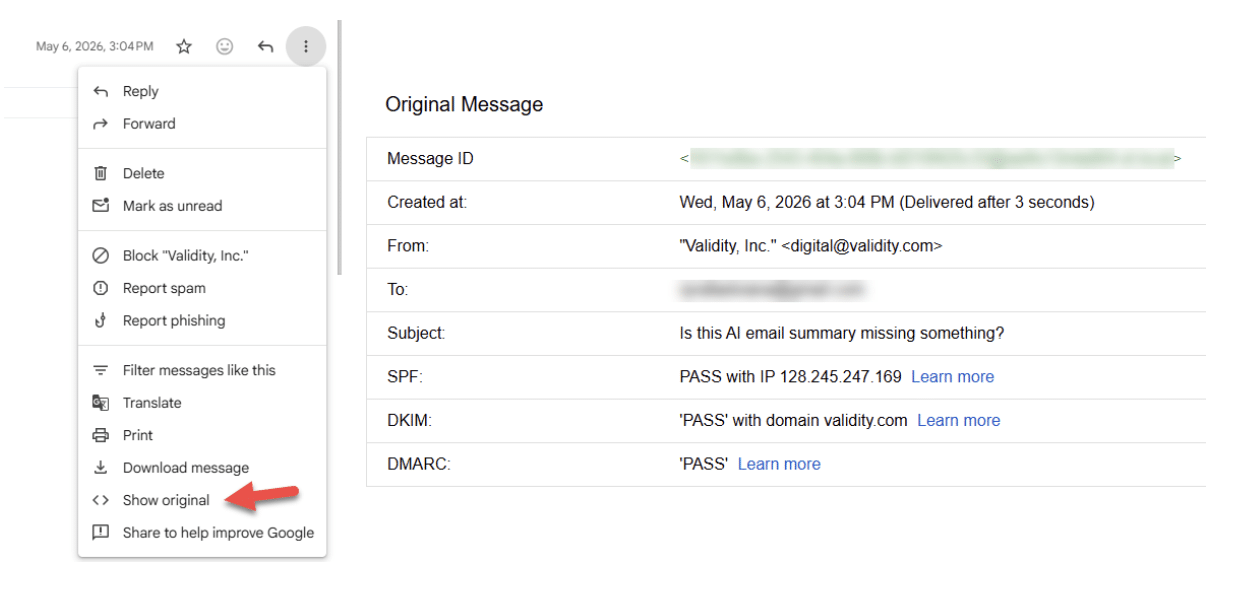
Once everything is set up on the sending platform, send yourself a test email. Validity Engage users can use the Email Creation & Testing capability to do this. Alternatively, send to a Gmail or Google Workspace address, click the three dots, then click “Show original.” That page shows whether SPF, DKIM, and DMARC are passing their checks. Confirm everything is properly configured before you start sending as the new brand.
Tell your subscribers ahead of time
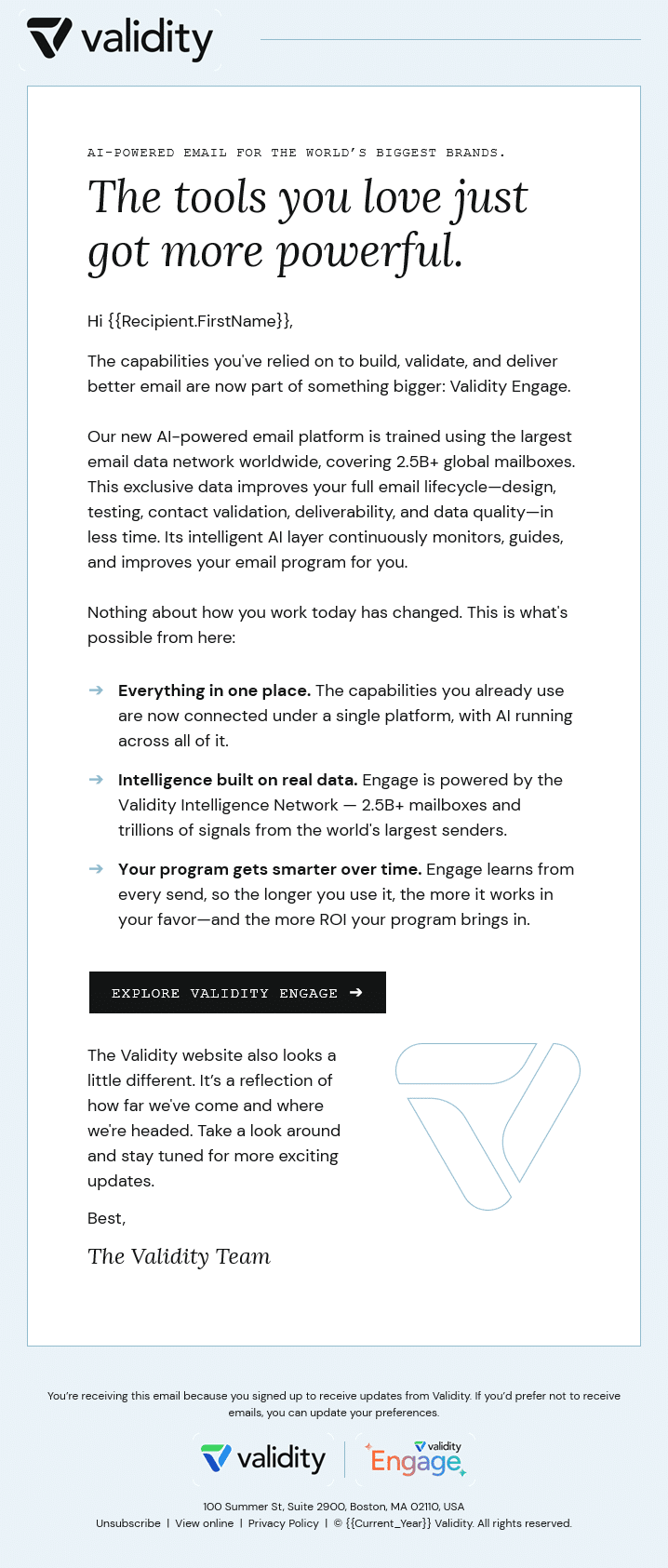
This is the most important task, and the one most teams skip. Send a pre-announcement email to your current mailable list, ideally 2–4 weeks in advance. Important: don’t send this to your entire list of email addresses. Send it to the list of addresses that have opted in and that you regularly use to talk to your clients and prospects. Don’t use this as an opportunity to wake the dead—you’ll end up sending to spam-trap addresses. Best case, your sending domain reputation drops a bit; worst case, your IP and domain get blocklisted.
Your campaign goal is to let your most valuable audience know what’s changing: the new sender name (friendly from), new from-address (including the domain), URL, logo, and so on. Don’t forget to tell them what’s staying the same and what they need to act on, like passwords or how to access things on different devices. It’s also a good idea to include a link to opt out of future emails; that keeps your list cleaner and more receptive. Communicating this through a trusted source, your current domain, is what helps reduce spam complaints on your first new branded send.
A strong pre-announcement email typically checks these boxes:
- Introduces the new brand
- Includes a new logo that references the current brand
- Explains any URL changes (bonus points for a screenshot of how the new sender will look in the inbox)
- Provides critical information about accessing accounts with existing usernames and passwords
- Reminds users to update their phone apps
- Links to official channels (LinkedIn, Facebook, X) that are also announcing the rebrand, so the story stays consistent everywhere
Here’s an example of one we sent recently:
Update templates and creative without breaking what works
Next, it’s time to map out what needs updating, including both transactional and marketing messages. A full redesign happening at the same time as the domain switch is risky. Change one variable at a time so you can attribute any deliverability or engagement dips.
Rebuild templates around the new brand system (logo, colors, type, voice) but preserve the structural elements your engagement data has already proven, like subject line patterns, preheader length, or CTA placement.
Validity Engage users often rely on its template capabilities to build an organized, centralized repository of creative, synced directly with their ESP. That helps with the heavy lifting of coordinating multiple stakeholders and running QA to make sure everything looks great across various devices.
Migrate your data cleanly
A new domain means you’re starting from scratch and will need to build up a positive sender reputation. Some brands are fortunate enough to have a dedicated IP with a long-standing positive reputation; if so, the new brand can send from that IP and inherit the benefit. Check your Sender Score for a read on your current sender reputation.
Before your first branded send, run list hygiene: suppress hard bounces and remove subscribers who haven’t engaged in 3-6 months. A more proactive approach is to run your list through a list-cleaning service, which checks every address for syntax, domain, MX records, and mailbox existence, then tag each one valid, invalid, or risky, suppressing the bad ones.
Sending your first new-brand campaign to a dirty list is the fastest way to land in spam. To cover segmentation carry-over: make sure your engagement segments, suppression lists, and preference-center mappings all survive the migration.
Go slow on launch, go hard on monitoring
Building a strong reputation for a new domain (and IP) takes a deliberate ramp: start low, around 1,000 emails, then increase volume gradually, roughly 30% between sends. Send to addresses that have engaged recently; that tells you those addresses are active and functioning, which increases your odds of engaging them again. Domain and IP warming is a long process, so don’t rush it.
During ramp-up, monitor these elements closely and act by slowing down and investigating if anything looks off:
| KPI Category | KPI Name | Why Critical (for Less Engaged Segments) | Goal / Threshold | Tracking Source |
|---|---|---|---|---|
| Deliverability | Complaint Rate | Top indicator of unwanted mail; high reputation risk. | < 0.1% | ESP / Deliverability Tool |
| Hard Bounce Rate | Shows list quality issues; high reputation risk. | < 1-2% | ESP / Deliverability Tool | |
| Inbox Placement Rate (IPR) | Measures true reach (Inbox vs. Spam). Essential health check. | Maintain Stability | Validity Engage / Seed Tools | |
| Spam Trap Hits / Blocklisting | Severe reputation damage, even from few hits. | ZERO | Validity Engage / Monitoring | |
| Engagement | Click-Through Rate (CTR) | Primary positive signal of content relevance & interest. | Track Trend / Compare Tests | ESP Reports |
| Conversion Rate | Measures direct business impact (registration, download, purchase). | Track Trend / Compare Tests | Web Analytics / ESP | |
| Open Rate | Less reliable due to MPP; use directionally. | Monitor Trends (Cautiously) | ESP Reports | |
| Other | Unsubscribe Rate | Indicates content/frequency issues (less severe than complaints). | Monitor Spikes | ESP Reports |
Land the rebrand, keep the inbox
Rebranding is exciting! But it can be easy to get carried away and neglect the not-so-glamorous steps. If you take your time with the details and treat this operation more than just a design project, you’ll be headed towards sending success.
If you want a single platform that ties sending infrastructure, deliverability monitoring, list hygiene, and inbox placement into one workflow, take a look at Validity Engage.
AI-powered email intelligence Built on the world’s largest email data network, Validity Engage removes risk and boosts email performance—so you can produce exceptional results in less time.

Rafael is a Sr. Email Strategist at Validity.