Key takeaways ✨
|
Last year was packed with big shifts in the world of email; it was tough to keep up! My colleagues and I recently put together a detailed recap with predictions for 2026 to help make sense of everything.
But with the rise of Inbox AI and no sign of new innovations slowing down, it’s clear that just setting goals for the new year won’t cut it anymore. To stay ahead, you need success metrics that give you a full view of your program’s business impact, engagement, and deliverability.
These metrics help you see if your audience is taking meaningful steps toward your business goals—whether that’s direct conversions for B2C brands or nurturing leads and moving them through the evaluation process for B2B.
I hosted a webinar that covered exactly that, which I invite you to watch here. In this post, I’m keeping things short and sweet while also answering some of the questions I didn’t have time to tackle live about the metrics that matter most.
Table of contents
- Business impact metrics
- Engagement metrics
- Deliverability and reputation metrics
- Diagnosing problems with the metrics that matter
- Additional questions from webinar attendees
Let’s dive in, starting with a breakdown of each category of metrics you should care about.
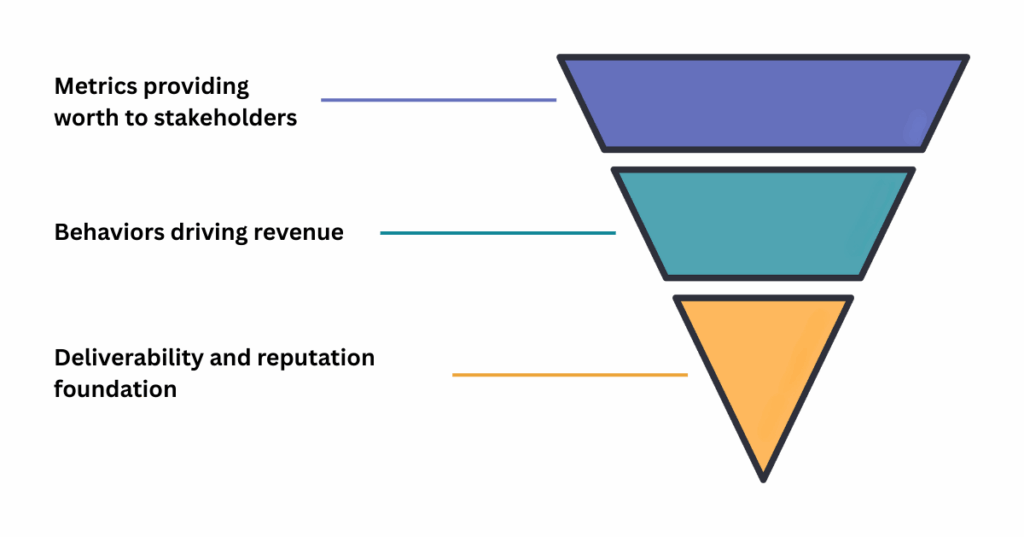
Business impact metrics
First up is business impact metrics. These are the insights that show how your email program contributes to revenue, growth, and ROI. In other words, the numbers your key stakeholders and your boss really care about.
| Metric and Formula | Benchmark / Goal | Strategic Significance |
|---|---|---|
| Conversion Rate (Conversions / Delivered Emails) × 100 | Campaigns: 0.5% – 1% Automations: 1% – 5% | The “ultimate source of truth” for revenue potential. High clicks with low conversions indicate a landing page/offer issue. |
| List Growth Rate [(New Subscribers − (Unsubscribes + Hard Bounces)) / Total List Size] × 100 | 2.5% net growth month-over-month | Counters “natural decay” (approx. 25% yearly). Focus on net growth rather than just top-of-funnel signups. |
| Subscriber Lifetime Value (LTV) (Monthly Revenue from Email / Total Subscribers) × Average Lifespan (Months) | 3:1 LTV-to-CPA Ratio | Defines the ceiling for acquisition costs. Helps justify retention and personalization budgets. |
| Return on Investment (ROI) [(Revenue − Cost) / Cost] × 100 | Positive ROI (variable) | Measures macro-efficiency of the email program yearly or micro-efficiency of specific campaigns. |
| Revenue Per Email (RPE) Total Revenue (Campaign) / Delivered Emails (Campaign) | Beat your historic average | Measures efficiency regardless of list size. Useful for comparing newsletters vs. promotions. |
| Customer Acquisition Cost (CAC) Total Spend (Month) / New Subscribers (Month) | Align with budget cycles | Tracks cost to acquire new subscribers. Must be balanced against LTV for profitability. |
| Weighted Value (B2B) Total Campaign Revenue / Delivered Emails | Example: 10% of $10k = $1,000 | Assigns dollar value to non-revenue actions (whitepapers, webinars) based on pipeline contribution. |
Engagement metrics
Engagement metrics reveal how people interact with your email program. These actions ultimately drive the business impact metrics above. The table below summarizes the key engagement metrics that tell you how your audience is consuming your email content.
Here is your content converted into a clean plain striped Bootstrap table:
| Metric | Benchmark / Goal | Strategic Significance |
|---|---|---|
| Open Rate (Total Opens / Delivered Emails) × 100 | Directional trend | Effectively “broken” due to Apple MPP. Use for trendlines only — never for absolute truth or hard segmentation. |
| Click-Through Rate (CTR) (Total Clicks / Delivered Emails) × 100 | Global Average: ~2.3% | Your high-level “North Star” for campaign performance. High CTR indicates strong alignment between subject line and content. |
| Click-to-Open Rate (CTOR) (Total Clicks / Unique Opens) × 100 | Target: 10% – 15% | The “content auditor.” Measures how effectively your copy drives action after someone opens the email. |
| Read Rate / Dwell Time % of emails viewed for 8+ seconds | Target: > 60% Read Rate | The only way to know if your copy is being read vs. deleted. Signals when to shorten content or improve design hierarchy. |
| Unsubscribe Rate (Total Unsubscribes / Delivered Emails) × 100 | Target: < 0.5% | The “Good Goodbye.” Spikes may indicate list fatigue (over-emailing) or a breach of trust from the original signup promise. |
Deliverability and reputation metrics
Call it “consultant bias,” but after 12 years in the industry, I’ve found that these metrics are the true make-or-break factors for a successful email strategy. If your messages aren’t reaching the inbox, they’re never going to be seen by your carefully targeted audience.
| Metric | Benchmark / Danger Zone | Strategic Significance |
|---|---|---|
| Bounce Rate (Total Bounced Emails / Total Sent Emails) × 100 | Goal: < 2% | Measures list hygiene. High bounces indicate invalid addresses or blocking at the receiving server. |
| Inbox Placement Rate (IPR) [(Total Sent − Total Bounced) / Total Sent] × 100 | Confirm visibility via third-party tools | The only metric that confirms whether your email landed in the inbox versus the spam folder. |
| Spam Complaint Rate (Total Complaints / Total Delivered to Inbox) × 100 | Goal: < 0.1% Danger: 0.3% | The “reputation killer.” Exceeding 0.1% (1 in 1,000) can cause Google and Yahoo to route messages to spam. |
| SRD Rate (Outlook) [Total Junk Votes / (Total Junk Votes + Total Not Junk Votes)] × 100 | Goal: < 40% | A polling system where Microsoft users vote on whether they wanted your email. |
| Sender Score A 0–100 “Credit Score” for your IP | Goal: Above 80 | Provides a consolidated view of sending health. Below 80 indicates reputation issues that need repair. |
| Spam Traps Decoy addresses used to catch spammers | Goal: Zero hits | Hitting spam traps suggests list purchasing or failure to clean old, inactive data. |
| Google Postmaster Tools Google Compliance Status | Goal: All “Green” | The single source of truth for Gmail delivery, tracking requirements such as SPF, DKIM, and DMARC. |
| Microsoft SNDS SNDS Filter Result | Goal: Green (< 10% to Spam) Danger: Red (> 90% to Spam) | Provides a “traffic light” signal for IP health within Microsoft/Outlook. |
Land in inboxes, not spam folders
See deliverability problems before they cost you with real-time placement testing, reputation monitoring, and authentication checks in your workflow.

Diagnosing problems with the metrics that matter
In today’s landscape, guessing won’t cut it—you need a clear diagnosis of any email issues you’re dealing with. The visual below breaks down four common “something’s wrong” scenarios, like low open rates, weak click-to-open rates, high clicks with no conversions, or scary bounce spikes. For each one, we’ll show you where to look first—whether it’s inbox placement, creative, content alignment, landing pages, or data hygiene—and what steps to take next.
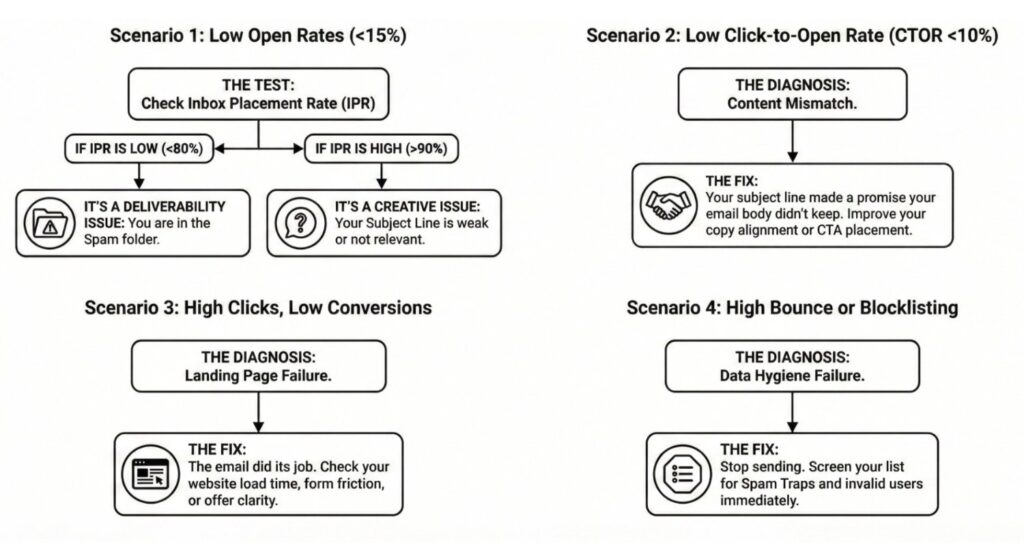
Here’s a transcript of the image:
Scenario 1: low open rates (<15%)
Check your inbox placement rate (IPR). If it’s low, or less than 80%, it’s a deliverability issue. You’re likely in the spam folder. It your IPR is high, or above 90%, it’s probably a creative issue, like a weak or non-relevant subject line.
Scenario 2: low click-to-open-rates (CTOR <10%)
Your content is mismatched. Your subject line made a promise your email body didn’t keey. Improve your copy alignment or CTA placement.
Scenario 3: high clicks, low conversions
Your email did its job, but your landing page is failing. Check your website load times, form friction, or the offer clarity.
Scenario 4: High bounce or blocklisting
Your data hygiene is failing. To fix this, stop sending. Screen your list for spam traps and invalid offers immediately before sending again.
Additional questions from webinar attendees
Now that we’ve covered the three primary types of email metrics and how to diagnose issues, let’s dig into some of the specific questions and scenarios that came up during our webinar.
Q: “We noticed our domain reputation is low even though our IP reputation looks good — what could be causing that, and how should we approach a warmup plan?”
A: If your IP reputation looksfine, but your domain is struggling, it usually means mailbox providers trust the infrastructure but are still on the fence about your brand. That can come from shared IPs, inconsistent practices across tools using the same domain, or weaker engagement and complaint history tied to your domain.
The fix is to gradually rebuild trust. Start by targeting your most engaged audience, clean up risky or old data, and ramp up volume slowly and predictably with helpful, relevant messages. Over time, consider splitting traffic by subdomain or moving key programs to a dedicated IP to give your best-behaving mail a cleaner reputation path.
Q: “With MPP and bot clicks inflating engagement, how are we supposed to trust CTOR or run meaningful A/B tests now?”
A: It’s true—MPP and security tools have made opens and clicks noisier. But that doesn’t mean testing is useless; you just need to shift your focus closer to actual business outcomes. One way to tackle this is by splitting reporting between Apple MPP users (a good starting point is identifying addresses with @icloud.com) and non-MPP audiences. Treat opens as a rough signal—not as a precise metric you can rely on.
When it comes to A/B testing, aim for metrics that really matter, like qualified clicks, conversions, or revenue per send. Don’t forget to use bot filtering or custom rules to strip out the most obvious fake activity. Instead of obsessing over tiny open rate changes, test bigger ideas and pick winners based on how they impact key results further down the funnel.
Indistry-leading email testing
See what your emails look like in 100+ email clients and catch errors—like Dark Mode misses and accessibility fails—before sending.
Q: “For those of us sending to B2B, especiallyOffice 365 and Google Workspace addresses, what’s the best way to avoid getting blocked or flagged?”
A: B2B environments arenotoriously picky, so you need to be rock solid from both a security and data quality angle. Start with ensuring your SPF, DKIM, and DMARC records are squeaky clean and all line up with the domain in your From address. Using a dedicated marketing subdomain that people recognize can also go a long way.
On top of that, stick to permission-based lists, and warm up corporate domains gradually—no sudden spikes in volume that could raise red flags. And, of course, your content matters. Focus on sending emails that feel genuinely useful in a work inbox, not spammy blasts full of attachments.
Keeping up with changes and deliverability best practices with insights
The last question of the webinar was one I’m always excited to answer; it means people are ready to take their metrics to the next level!
Q: “Do you have recommendations for tools that can help identify spam traps, clean lists, or keep up with deliverability best practices?”
A: The good news? You don’t have to troubleshoot on your own. Tools like Litmus from Validity help you test both creative and deliverability before you hit send. From subject line and content variants to inbox previews and spam filter checks, it’s easy to pinpoint whether the problem is “your message isn’t compelling enough” or “your message isn’t even making it to the inbox”—so you can fix the right issue first.
You can also take advantage of postmaster portals like Google Postmaster Tools, Microsoft SNDS, and Yahoo Sender Hub can help you keep a close eye on how mailbox providers see your traffic over time.
BriteVerify from Validity is also a great tool helping you keep bad addresses and recycled traps out of your list.
Looking for more information on the best metrics for your email program? Check out the full webinar session here.
Don’t let bad data sabotage your campaigns.
Validity Engage helps you remove invalid emails and duplicates before you send—saving money and improving deliverability.


Rafael is a Sr. Email Strategist at Validity.
