Key takeaways ✨
|
Mailbox providers (MBPs) are relentlessly raising the bar for email marketers. They’re no longer just asking, “Is this sender authenticated?” Instead, the question has become, “Does this message deserve to be in this subscriber’s inbox?”
AI-driven mailboxes and snippet digest views mean that email content optimization is back to the forefront of the conversation—and this optimization plays a major role in a campaign’s success or failure. If you’ve nailed your authentication setup, consent processes, and bulk sender rules, but still see deliverability issues, it may be time to check the email content itself.
Recently, industry expert LoriBeth (LB) Blair joined Guy Hanson and me on Validity’s Email After Hours podcast for a deep dive into the content issues she sees all too often. In this blog post, we’re recapping the episode by breaking down the top four ways your email content may be killing your deliverability.
Table of contents
- Images: optimize or pay the price
- Links: broken = suspicious
- Rendering: If it looks broken, it’s risky
- Relevance: the ultimate filter
- Test before you send
Let’s dive in!
1. Images: Optimize or pay the price
Images don’t automatically send your emails to the spam folder, but poorly optimized ones can hurt your email program’s inbox performance and engagement rates. As LB put it on the podcast: “If putting an image in your email causes it to go to spam, that is not your only problem.”
The issue isn’t the inclusion of images. It’s how they’re built and displayed.
MBPs are under increasing pressure to manage computing and storage resources. Oversized images and heavy GIFs create unnecessary strain and a poor user experience, particularly on mobile.
How should marketers be optimizing images in their emails?
- Compress images to reduce file size. Large images increase storage and processing demands for MBPs, and slow load times for subscribers.
- Avoid image-only emails. Filters can’t easily interpret image-only content and screen readers can’t access it without proper text.
- Maintain a healthy text-to-image balance. Text gives filters context and helps classify your message accurately. It also protects the experience if images don’t load, improving both accessibility and engagement.
- Ensure images load quickly. Fast-loading emails feel professional and capture attention quickly, while slow ones get ignored. Low engagement negatively impacts sender reputation.
Another critical note for images in emails: don’t forget about the alt text. Descriptive alt text isn’t just about ensuring accessibility—it can influence deliverability. When images are blocked (which happens by default when emails land in the spam folder), alt text becomes part of the visible message. In this scenario, the subscriber’s ability to digest the alt text becomes essential, especially if you want them to rescue you from the spam folder.
LB recommends a simple approach to writing alt text: describe what you see. “Look at the image and say aloud what it is.”
Marketers should ask themselves: “If someone couldn’t see the image, would they still understand the message?” If not, they’re missing opportunities to meet accessibility best practices, establish clarity, and promote critical engagement that can potentially impact inbox placement.
Design tools anyone can use
Easily build on-brand, accessible emails using our drag-and-drop builder and templates.
2. Links: broken links are suspicious
Broken links aren’t just an embarrassing marketing oops—they’re a cybersecurity red flag. Spam filters actively check links. If a URL leads to a 404 error page or behaves unpredictably, it raises trust concerns. Historically, malicious actors have sent emails with “clean” links and later swapped them for harmful content—which means filters are cautious by design.
Marketers should ensure they:
- Test every link before sending.
- Leverage HTTPS-secured URLs.
- Avoid public link shorteners, like tiny.url or bit.ly.
- Brand their tracking domain (e.g., link.yourdomain.com)—when your link domain aligns with your sending domain, you reinforce trust and reduce filtering complexity.
If you’re linking to a PDF? Avoid auto-download behavior, especially in B2B environments with strict security filters. A two-click experience (landing page first, then download) is safer and signals legitimacy. In email marketing, always build trust and reputation through transparency and predictability.
3. Rendering: If it looks broken, it’s risky
You can follow every infrastructure and segmentation best practice in the book and still lose if your email renders poorly. Today’s subscribers check email in multiple viewing environments—on mobile devices, desktops, tablets, and increasingly, in dark mode. If your message isn’t responsive, includes confusing or poorly placed calls-to-action, or becomes unreadable in dark mode, subscribers will feel a sense of doubt.
Doubt harms engagement, and low engagement hurts reputation. As Guy Hanson shared during the episode: “The most successful email programs are going to be the ones that start making trust visible, shifting from simply reaching the inbox to proving you belong there.”
That trust extends to design and rendering. With roughly half of mobile users now using dark mode, failing to optimize for it isn’t just a visual oversight—it’s a subscriber experience issue.
Marketers should confirm that their emails:
- Look good with images on and off.
- Render properly in dark mode.
- Include clear, visible CTAs (yes, even above the fold).
- Include quick-loading images.
LB was spot-on with her assessment and these rendering checks: “We all have to account for attention spans in the age of TikTok, which are short—perilously short.” Emails should be digestible and clickable, even at a quick glance or at first impression.
Take the stress out of sending
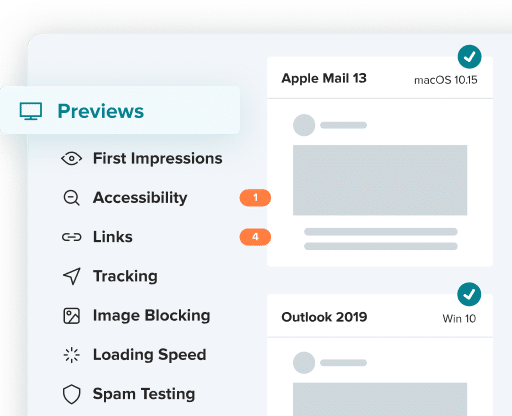
Preview and test your sends on 100+ popular email clients—updated in real time as clients release new versions.
4. Relevance: the ultimate filter
Optimizing every image, securing every link, and perfecting your rendering are crucial—but relevance is still king. More than ever, MBPs are evaluating engagement signals at the individual user level. If a subscriber ignores, deletes, or fails to engage with your content, that behavior informs filtering decisions.
Deliverability is no longer just about technical compliance. It’s about sustaining proof that your messages matter to your subscribers.
Marketers should ask themselves:
- Is this email timely?
- Is personalization meaningful—and not just a merge tag?
- Is the offer providing value?
- Is the next step obvious?
- Does the subject line effectively state relevance and generate interest?
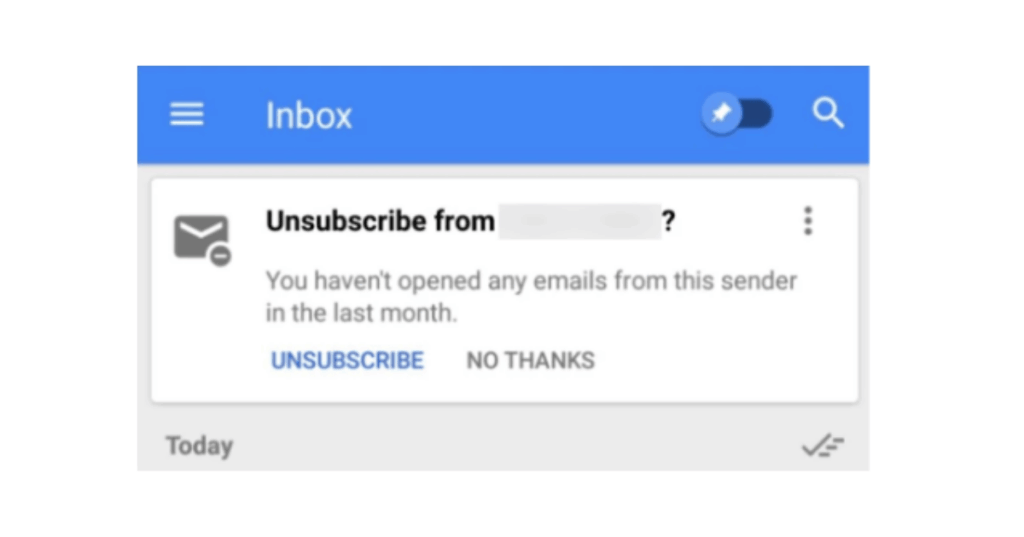
If subscribers aren’t engaging or interested, filters eventually notice. For Gmail in particular, users are prompted to unsubscribe from brands they fail to open emails from in the last 30 days:
Optimize your subject lines so they:
- Fit within a standard character limit on mobile (35-40 characters).
- Front load the primary offer, value point or incentive.
- Reflect known subscriber interests.
- Match the content inside.
In today’s email marketing world, misleading subject lines not only degrade trust—they can lead to costly legal ramifications. Simply put: sell it like it is in email subject lines!
Test before you send
Most content-related issues can be caught by thorough testing before a send goes live. Before launching a campaign, you should:
- Validate all links.
- Check rendering across devices and in dark mode.
- Review image sizes.
- Confirm accessibility elements (like alt text).
- Send inbox seed tests before deployment.
Content missteps (like broken links, oversized images, or rendering issues) can undo months of strong sending practices. Content testing isn’t optional; it’s a pivotal part of the deliverability process.
The bottom line: marketers and email programs that prioritize optimized, trustworthy, accessible, and relevant content will stand out in crowded mailboxes.
Want a fun deep dive for your ears?
Check out our fabulous Email After Hours podcast episode featuring LB Blair. You can listen to the episode on Spotify for all the nitty-gritty on how your email content may be killing your deliverability.

Danielle is a Sr. Email Strategist at Validity.
