
What exactly is email client market share and why is it important?
There are countless applications and platforms your subscribers are using to view and engage with your emails. It wouldn’t be out of the realm of possibility to say there are hundreds of applications.
Litmus has reported on email client market share over the years to help email marketers everywhere understand monthly market trends for email clients like Gmail, Apple Mail, Outlook, and more. Knowing these movements empowers marketers to make better decisions when it comes to strategy and prioritization for design, coding, and overall email program focus.
July 2026 Email Client Market Share Report
Calculated from over 1 billion opens in Litmus Email Analytics, in July 2026.
Understanding email clients can be a nuanced affair—but it doesn’t need to be. Below, you’ll get a quick overview of what each email client in the top 10 actually refers to, including whether it’s a grouping of several email clients or specific to a platform or operating system.
Apple Mail, Apple iPhone, Apple iPad, and Apple’s Mail Privacy. Starting with Apple iOS 15 (iPhone), iPad OS 15, and Mac OS Monterey, opens from users opted into Apple’s Mail Privacy Protection do not pass along specifics of the email client version and platform. As such, they are not considered reliable opens, but we are able to determine if they are in Light or Dark Mode. Additionally, some third-party apps used on Apple devices will also show up as Apple.
Gmail in a web browser, Gmail mobile app (Android), Gmail mobile app (iOS), all reported as via Gmail’s image cache. Because of Gmail image caching, we do not get specifics of the Gmail email client version and platform. Email opens show as Gmail only if the email was opened in a Gmail client. If it’s sent to a gmail.com email address, but opened in an email client that is not a Gmail email client, it will show as the email client it was opened in. Learn more.
These are desktop opens in Outlook. The majority of these opens are Outlook 2016 and newer, which all have the same identifiers so we are not able to distinguish between them. Other opens include Outlook 2016 Pro, Outlook 2013, Outlook 2010, Outlook 2007, Outlook 2000-2003, and Outlook for macOS.
Similar to Gmail, Yahoo utilizes image caching to load images, which means we don’t get any specific information on the device. Opens reported as Yahoo Mail include webmail opens as well as mobile app opens on Android and iOS.
Opens in a mail app on an Android (does not include the apps that use image caching, such as Gmail and Yahoo). Learn more about how third party apps on mobile are identified.
Users who log in to their Outlook webmail on a web browser. The web browser may be on desktop or mobile (For example, when someone opens a browser on their phone and goes to Microsoft to check their Outlook mail.)
All opens on the Mozilla Thunderbird email client, which is a free desktop client.
Detection for Orange.fr was added on June 2022.
All opens in the Samsung Mail app on Android.
Detection for Windows Live Mail was added on August 2022.
Key Takeaways: Email Client Market Share (2024-2026)
- 1. Apple and Gmail stay on top : Together, Apple Mail (including Mail Privacy Protection) and Gmail account for nearly 90% of the total market share, making optimization for these two environments a no-brainer for email deliverability and rendering.
- 2. Impact of Mail Privacy Protection (MPP): Studies show that Apple’s MPP now impact roughly 55-60% of all email opens. shift from tracking “open rates” to more reliable engagement metrics like click-through rates and conversion data.
- 3. Rise of Mobile and Dark Mode: Mobile devices continue to be the primary reading environment for the majority of subscribers, while Dark Mode adoption remains a critical design consideration, now used by over 25% of the total user base.
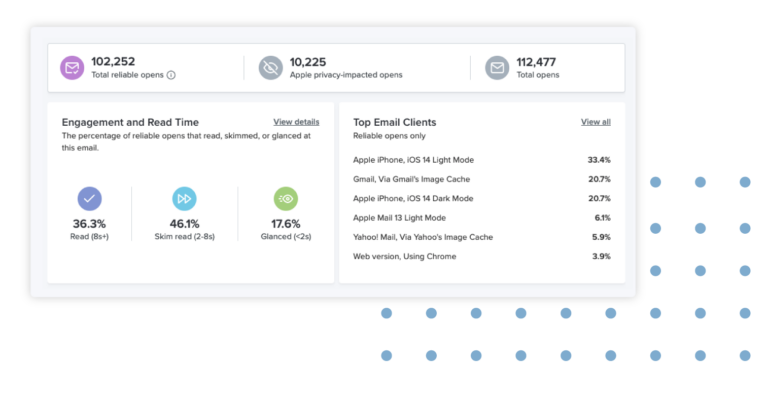
How do we know which email client was used to open the email?
Email clients pass along a user agent string that helps identify them. Sometimes the same user agent is used for multiple email clients, or an app may use the user agent of the operating system/device it is being run on. That’s why it can get a little tricky to distinguish email clients! Using the email client market share as a guide for top 10 email clients is helpful, but it is not the only thing you should use to determine which email clients you should test against. Making sure your email looks great in a broad range of email clients is our top tip.
Get insights into your own email client market share
Your own top ten email clients may look different from this list. The best way to know is to track your own audience email client habits is using Litmus Email Analytics.
Get the kind of visibility into your audience your email service provider (ESP) alone can’t offer—including opens impacted by privacy measures introduced by email clients and Dark Mode usage. Book a demo to see how you can get the data you need to be a more effective email marketer.
Book a demoJoin 800,000+ users who build, test, and trust their emails with Litmus.
Litmus Enterprise
Ready to get the most out of your email marketing?
Contact us today to see how a Litmus Enterprise plan can maximize your email ROI.
- Custom users and Email Previews
- Never send another broken email with always-on email monitoring
- 100,000 Litmus Personalize impressions per month
- Engage subscribers with Countdown Timers, Progress Bars, and more
- Create on-brand quickly emails with or without HTML know-how
- Centralize brand assets with Design Library
- Automate QA and fix errors before every send with Litmus Test
- Reach the inbox with pre-send Litmus Spam Testing
- Boost ROI with powerful analytics and in-depth audience insights
- Centralize review and approvals to save time and boost collaboration
- Easily manage brand settings, templates, and account access across teams and subaccounts
- Keep data and assets secure with advanced security settings and user permissions
- Leverage Enterprise-level ESP integrations to speed production and combine valuable insights
Compare All Plans
Best email clients
Choosing the best email client depends on your specific needs, device, and priorities. We’ve evaluated the top email clients across five key categories to help you find the perfect fit.
Best for business
For enterprise environments, the best email client for business combines seamless calendar integration, team collaboration features, and robust security. Microsoft Outlook leads this category with comprehensive organizational tools, meeting scheduling, and integration with Microsoft 365 services. Apple Mail caters to Mac-based businesses requiring native integration with iOS devices, while Google Workspace’s Gmail client offers cloud-native collaboration and real-time communication with team members. The best email applications for professional use prioritize productivity features like shared calendars, task management, and advanced filtering to streamline business communication.
Best for privacy
Privacy-conscious users should consider email clients that prioritize encryption, minimal data collection, and transparent privacy practices. Thunderbird offers open-source transparency, and specialized privacy-focused email clients provide end-to-end encryption and anonymous communication features. These best email client programs emphasize data protection and user control, ensuring your email remains private and secure from unauthorized access.
Best for Windows
The best Windows email program combines native operating system integration, intuitive design, and comprehensive features. Microsoft Outlook remains the industry standard for Windows users, offering deep integration with Windows OS, Microsoft 365, and business environments. Thunderbird provides a lightweight, open-source alternative for users seeking simplicity without sacrificing functionality. These best email applications for Windows deliver fast performance, reliable synchronization, and seamless calendar and contact management.
Best for Mac users
Mac users benefit from the native integration of Apple Mail, which seamlessly syncs across macOS, iOS, and iPad devices through iCloud. Spark offers a modern alternative with advanced features like email scheduling and team collaboration. These recommended email clients for Mac prioritize performance, privacy through Apple’s ecosystem, and beautiful interface design optimized for macOS.
Best for mobile
Mobile email clients must balance functionality with user-friendly interfaces optimized for smaller screens. Gmail, Apple Mail, and Outlook mobile apps dominate this category, offering fast synchronization, easy navigation, and offline access to cached messages. Best email applications for mobile devices include specialized clients like Spark and K-9 Mail, which provide advanced features like unified inboxes and smart notifications. Mobile email clients are essential for professionals who need to stay connected and productive while away from their desks.
Have a question about the State of Email Client Market Share not answered here?
Ask the communityWhat is the State of Email Client Market Share?
The State of Email Client Market Share is a leaderboard of the most popular email clients as collected worldwide by Litmus Email Analytics. The figures displayed in the chart are the top 10 most popular email clients, updated on a monthly basis.
How often are new email client market share reports published?
Every month, you’ll find a host of fresh email client market share data from Litmus Email Analytics, offering insights into email client usage from the previous month. We aim to update this page as early in the month as possible.
Where does the data for the State of Email Client Market Share come from?
The data represented in the email client market share is collected by real-life Litmus customers who are using Litmus Email Analytics in their own emails. All opens detected are completely anonymous and do not contain any Personal Identifiable Information (PII).
Does the State of Email Client Market Share include privacy-impacted opens?
The State of Email Client Market Share is powered by data collected globally by Litmus Email Analytics. With the introduction of Apple’s Mail Privacy Protection (MPP), any email opens detected in Apple Mail on iOS 15 or later are classified as privacy-impacted opens. Privacy-impacted opens are included in Apple Mail opens. Learn more about how Litmus Email Analytics reports on Apple Mail opens.
What are privacy-impacted opens?
Since Apple’s Mail Privacy Protection went into effect in September 2021, Apple Mail users are able to turn on a feature that will disable open tracking. Essentially, if an Apple Mail user has Mail Privacy Protection turned on, you will not know if that user opened your email or not.
What can I do with this data?
Staying on top of the email client movers and shakers will help you make better decisions for your email program. By tracking email client market share trends, you’ll be able to better predict changes that could happen to your own email client market share—and so prepare you for those changes. Think of the data on this page as a baseline for knowing which popular email clients your own audience is likely to use. And then use this information to start testing. Be sure to start tracking which email clients your own audience is using so you can hone in even more on your testing and personalization.
How do I see which email clients my audience is using?
Use Litmus Email Analytics to generate your very own email client market share and see which email clients your audience is using. All it takes is embedding a snippet of HTML code to your emails. After you send, that little snippet of code will report back to Litmus where every single email open is taking place. Plus, you’ll also see how long your audience is spending reading your email and if they’re using Dark Mode or not.
What is an email client?
An email client is an application or software program that lets users send, receive, and manage email messages on their devices. Unlike webmail services like Gmail or Outlook.com—which operate directly through a browser—an email client works as a dedicated tool that connects to email servers and stores messages locally or syncs them across devices. Email clients provide greater control over your inbox and typically work without an internet connection for accessing cached messages.
What are the different types of email clients?
Types of email clients vary by platform and use case.
- Desktop email clients ( are installed directly on computers and offer powerful features for users and businesses.
- Web-based email clients operate through your browser and eliminate the need for installation.
- Mobile email clients are optimized for smartphones and tablets, helping you manage your inbox on the go.
- Enterprise email clients are designed specifically for business teams, featuring collaboration tools, calendar integration, and advanced security controls.
Email client market share: Why trust this data
 This work is licensed under a Creative Commons Attribution-NonCommercial-ShareAlike 3.0 Unported License.