Key takeaways ✨
|
One in six legitimate marketing emails fail to reach the inbox, according to Validity’s 2025 Email Deliverability Benchmark Report. The average global placement rates at 83.5% for the inbox, 6.7% for spam filters, and 9.8% missing. What’s worse is that this number is declining over time. As recently as February 2024, inbox placement rates were just below 87%. At Validity, we aim for a 98% inbox placement rate or better, so you can see how alarming these numbers are!
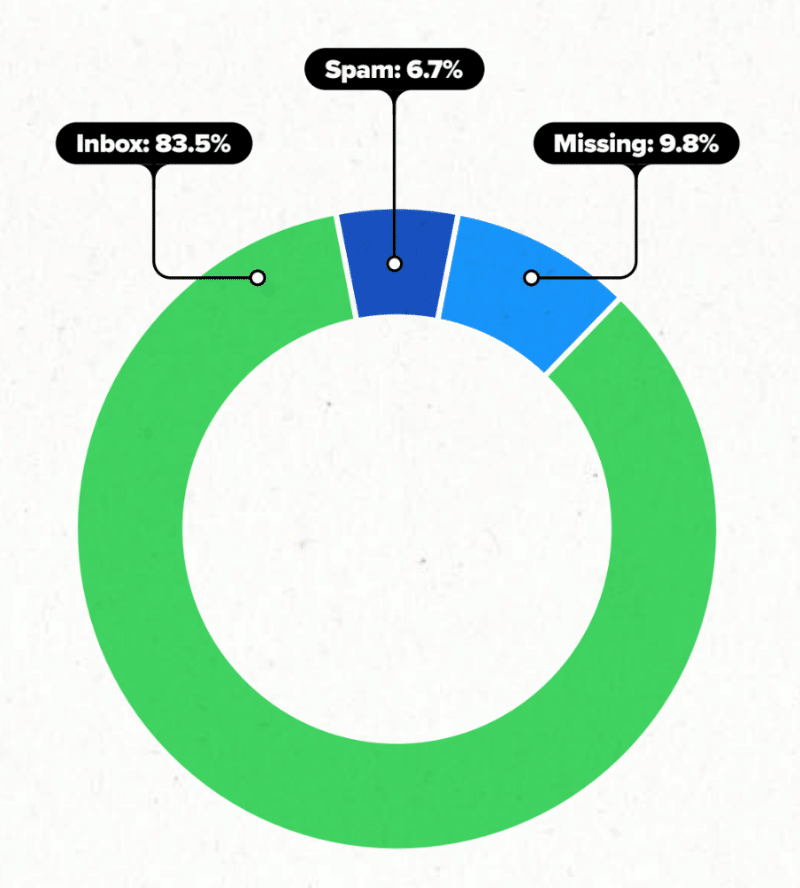
What’s going on? Well, every time you press send, your email goes through an obstacle course of deliverability checks. They’re meant to keep spammers and scammers from hurting your subscribers, but sometimes your innocent email marketing campaigns can get caught.
Three main factors influence your overall deliverability:
- Infrastructure: Identification and authentication records. These are technical must-dos like DNS, DKIM, and DMARC that your team (or your email service provider (ESP)) needs to complete if you want to send emails.
- Content: What your message contains and how your subscribers respond. If someone marks you as spam, you’re going to be in the spam folder.
- Reputation: The receiver’s rating of your sending domain and IP addresses, kind of like a credit score, but for email geeks.
If you’re struggling to land emails in the inbox, and you’ve already dotted your i’s and crossed your t’s with infrastructure, it’s time to dive into the nebulous black box of category #3: your email sender reputation.
Table of contents
- What is email sender reputation?
- What is domain reputation?
- Why has your email reputation gone down?
- How to recover from a poor sender reputation
- Email sender score best practices
Safeguard your email reputation
Validity Engage has the industry’s most exclusive email allow-list—helping senders reach more inboxes and bypass key spam filters around the world.
What is email sender reputation?
Your email sender reputation is a score or measure that Internet Service Providers (ISPs) assign to an organization that sends emails.
Your email deliverability is a result of your email reputation. The better your reputation, the more likely you’ll have higher email deliverability. ISPs look at several different factors when determining your reputation:
1. Your sender behavior
ISPs are closely watching the volume of emails you send and how consistent you are. Sudden spikes can make it look like you’re engaging in spammy behavior.
When you look at global sending volumes overall, you can see big spikes each November and December for Black Friday/Cyber Monday. As you get closer to these big-ticket seasons, slowly increase the volume of your emails instead of all at once.
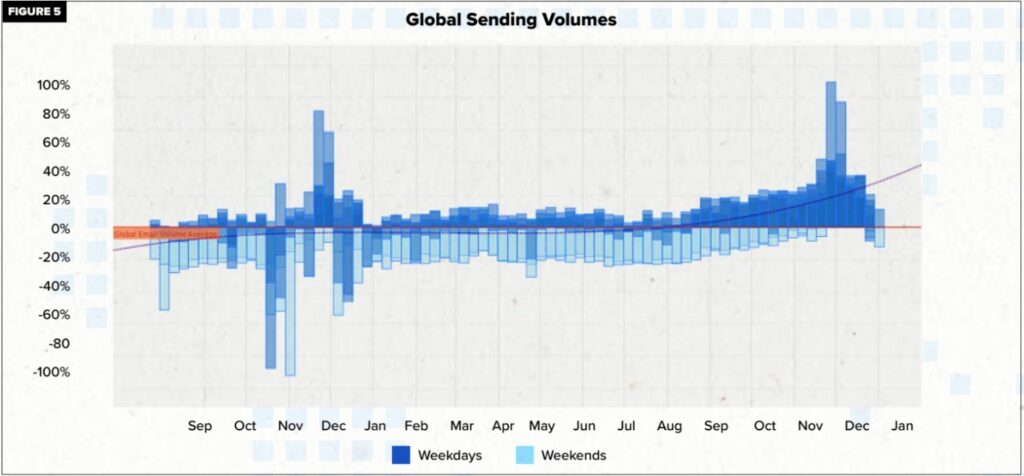
A sharp increase in volume—say, going from 1,000 emails in a single week to 15,000—is going to make an ISP notice. It’s okay to send lots of emails (yay for big email lists!) but don’t overload your subscribers.

LitTip: Consistency is key. Stick to a steady cadence and avoid massive jumps in volume.
2. Your subscriber behavior
Your reputation hinges on how your subscribers interact with your emails. Are they opening them, clicking through, replying, or forwarding? Or are they marking them as spam and unsubscribing? ISPs look for positive engagement signals.
ISPs regularly look at:
- Engagement: Deliverability metrics like how many subscribers engage with emails from you (based on actions like open, reply, forward, delete ,and click).
- Spam complaints: How many recipients mark your emails as spam.
- Unsubscribes: Your unsubscribe rate.
The more your subscribers engage with your content, the better your reputation. If they’re not engaging, it’s time to rethink your approach—because engagement is a vote of confidence in your emails.
3. Your email list hygiene
Keeping a clean email list is crucial for maintaining a good reputation. Hitting spam traps—those sneaky addresses designed to catch spammers—or being listed on a blocklist can seriously damage your standing.
Other factors ISPs evaluate include:
- If your organization hit any ISP spam traps or is on any blocklists
- Email bounces
Regularly scrubbing your lists for inactive subscribers and hard bounces will help you avoid these pitfalls. Good list hygiene shows ISPs that you’re sending to a healthy, engaged audience.
4. Your email authentication
ISPs want to see that you’re playing by the rules. Setting up proper email authentication protocols like SPF, DKIM, and DMARC helps prove your legitimacy. Think of these as the “ID checks” for your emails—showing that you are who you say you are and building trust with both ISPs and your audience.
Note: All ISPs weigh these factors differently.
What is domain reputation and sender score?
Each email sender has a sending domain. It’s the text that follows ‘@’.
For example, here the sending domain, or domain name, is ‘peppercontent.in’.
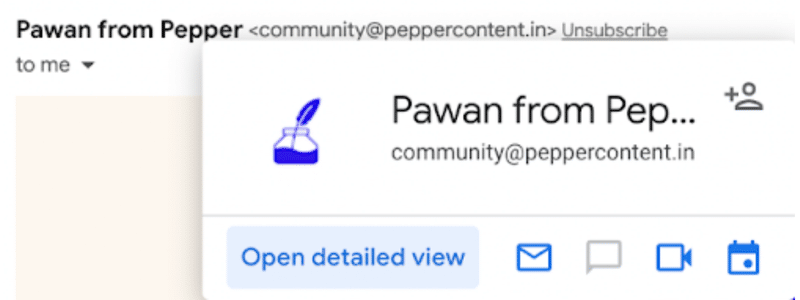
Your sending score depends on the domain and IP address you’re sending emails from.
If you’re on a dedicated IP address, for example, you’ll have a much clearer image of your email-sending reputation. But if you’re on a shared IP address, your email sending reputation may be impacted by others on your shared IP.
It’s easy to think of your sender score as an alpha or numeric score, but it’s better to think of it as the email-specific outcome of what people really think about your brand. If your subscribers sincerely like you, their behavior will show it, and you’ll be rewarded with inbox placement. Reputation isn’t a grade so much as an ongoing assessment of your brand’s respect for your customers.
How to check your email sender score
Email deliverability can make or break your email marketing strategy. Yet, when Validity asked attendees at their State of Email Live Event about their spam complaint rate—a key metric that determines your email sender score—19% didn’t know. (This is why we always recommend doing a deliverability audit on the regular.)
The good news is that checking these deliverability metrics, and determining your overall sender score, doesn’t have to be complicated or expensive.
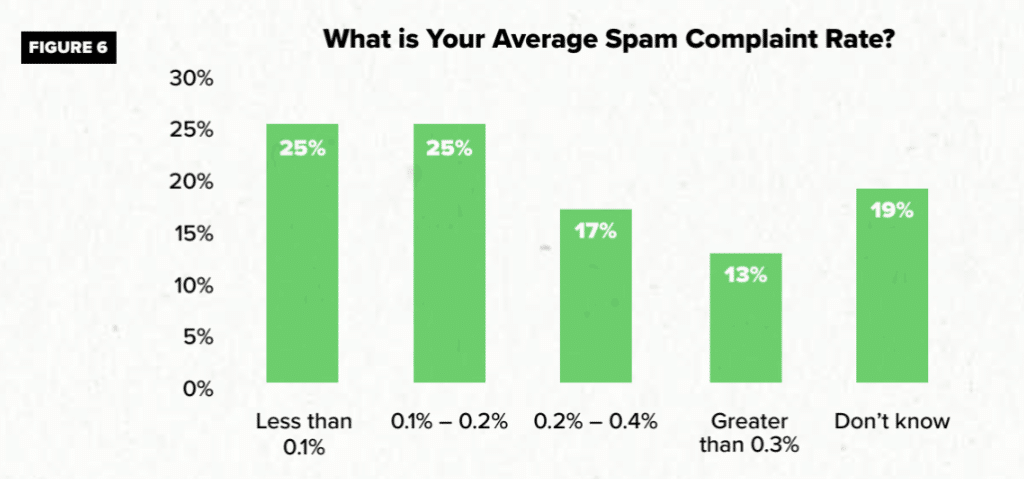
There are free tools out there, like Google Postmaster Tools or Validity’s Sender Score, that make it easy to see how your emails are performing and where you stand. Just type your domain or IP address into the tool and Validity will assess factors like blocklists, spam complaints, infrastructure, and send volume to give you a numeric value, kind of like a credit score, you can use to benchmark your performance.
Why has your email reputation gone down?
Your email reputation is shaped by several key factors including your:
- Sender behavior.
- Subscriber behavior.
- List hygiene.
- Email authentication.
If you’re seeing a dip in your reputation score—or noticing poor performance in your email campaigns—it’s worth taking a closer look at these areas:
Sender behavior
Sometimes, fixing your email reputation can be as simple as changing your own behavior. If you’re seeing a drop in your sender score, ask yourself:
- Is the volume of emails too high or inconsistent?
- Am I sending emails to people who have unsubscribed or show no engagement?
- What kind of automations do I have set up, and are they necessary?
- Have I landed on a blacklist or blocklist?
Subscriber behavior
Your sender reputation is directly tied to how your subscribers respond to your emails. If engagement is low, it’s time to dig into your metrics:
- Am I running any automated campaigns that consistently get low open or no clicks?
- What are my overall open and click rates for my email campaigns?
- How many unsubscribes have been reported recently?
- Am I providing a clear and easy way for people to unsubscribe?
- How many spam complaints am I getting?
- Are my emails too long and getting cut off by email clients?
Email list hygiene
If your subscribers aren’t responding to your emails the way you hope, then it may be a mismatch between who is on your list and the kinds of emails you send. Conduct an email list audit and ask yourself:
- Where did I get these subscribers? Did I have their explicit permission to email them?
- What is my bounce rate for hard bounces and soft bounces?
- Am I sending emails to spam traps?
LitTip: never buy an email list. That’s a surefire way to ruin your sender reputation.
Email authentication
Without proper email authentication, ISPs might not trust your emails. Make sure you have SPF, DKIM, and DMARC set up correctly. These protocols prove you are who you say you are, which builds trust with ISPs and helps protect your reputation. Not only is this important for your deliverability more generally, it’s now an essential part of complying with mailbox provider protocols, including Gmail, Yahoo, and Microsoft.
Diagnosing what’s causing a dip in your sender reputation helps you address the problem head-on and get back on track.How to recover from a poor sender reputation
Trust us, poor sender reputation can happen to anyone. In June 2022, Litmus experienced an issue with our email reputation: we noticed our inbox placement had gone from 98-99% to less than 90%.
Uh-oh. Luckily, we got it fixed quickly!
If this is happening to you right now, here’s what to do:
Step 1: Identify the problematic ISP
In our case, it was Gmail.
The key here is to identify which ISP you’re having difficulty with and send only to your most engaged audiences for that ISP. While this will drastically bring down the number of people you’re reaching with your emails, it will improve your engagement rates and ensure inbox placement.
This step will indicate to your mailbox provider that your emails are not spam, and your readers are engaging with them.
We used Litmus Email Analytics to identify subscribers who use Gmail to open our emails and segmented that audience into those who engaged in the last 10/30/45/60/90 days. We then suppressed Gmail subscribers who hadn’t opened in the last 10 days. Then, we slowly increased volume, week by week, and tracked engagement.
Step 2: Identify risky email automations and turn those off
Campaigns such as win-back email campaigns are risky. After all, they are reaching out to an already disinterested audience. The chances of them opening your emails and engaging with your content are low.
Email automations your subscribers and customers might not engage with include:
- Cart abandonment emails
- Re-engagement campaigns
Even though these email flows can sometimes work to revive disengaged subscribers, they have a higher likelihood not working. Many go unopened and not clicked—more than transactional or other emails in the promotions tab in Gmail. If these campaign emails do not lead to engagement, it will further harm your email reputation. Turn these campaigns off to improve your engagement rates if you’re having a reputation crisis.
Step 3: Contact your postmasters
Once you’ve taken steps to remedy your deliverability issues, but it’s still not working, you can also reach out to your ISP postmasters. A postmaster is the administrator of an email service. They deal with spam emails and sender reputation.
Once you’ve identified your problematic ISP, send them a report using these forms:
Gmail’s postmasters may not respond. So, until you see an improvement in your inbox placement, keep notifying Gmail of your issues through their postmaster contact form—advisably every week.
Outlook and Yahoo Mail, on the other hand, will likely respond to you via email within three to four days. Their response will indicate whether they’ve found issues with your email domain and are working on a fix, or that they haven’t found any issues.
Step 4: Start increasing send volume when engagement increases
Once you see an uptick in engagement rates—and only then—you can start sending emails to more people again.
For example, if you were previously only sending your campaigns to people who had opened your emails in the last 15 days, you can now raise the bar to 30 days. Monitor the new results and then rinse and repeat until you hit your typical, full sending volume.
For acquisition-related campaigns, where you’re contacting new or unengaged subscribers, having a secondary dedicated IP address is a good idea. It protects your primary IP address used for campaigns that drive business goals and need to have good inbox placement rates. Take the step to onboard a secondary IP address and a secondary sending subdomain for acquisition programs, cart abandon programs, and re-engagement nurtures.
Email sender score best practices
Hopefully, you’ll never have to deal with a dip in reputation like we did. (Phew, we hope it never happens again!) In the meantime, though, there are proactive steps you can take for your email marketing program:
1. Think about your send frequency
Subscribers who see your brand name pop up again and again in their inbox may start to get annoyed—especially if you’re using segmentation or personalization in your emails. The name of the game is engagement, so give your subscribers the option to choose which emails they receive from you.
This example from underwear brand ThirdLove is a great way not only to gather more first-party data from your subscribers but also to make sure that you’re sending the right emails to the right people:
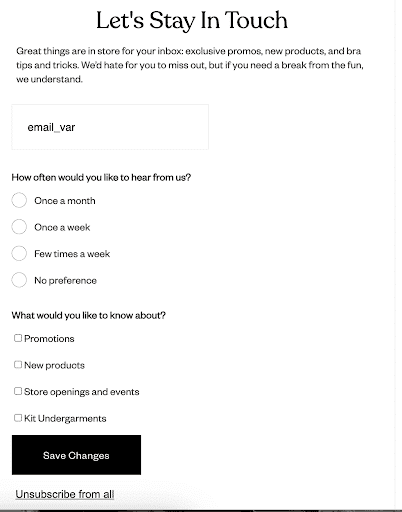
There’s an expectation that you need to keep sending emails to be doing email marketing right—but there is more value in sending fewer, more targeted emails to your list that receive higher engagement, rather than sending again and again to subscribers who aren’t opening or clicking, which can impact your sender reputation.
2. Make the unsubscribe easy
Similarly, make it as easy as possible to unsubscribe. No more “hacks” to get around legal requirements. Don’t fear the unsubscribe email list! It’s much better to have a slightly smaller list with higher engagement than a large list of people who don’t want to hear from you.
If you don’t make it easy to unsubscribe, you’ll just see a spike in spam complaints—which will hit your sender reputation hard. A clear unsubscribe link is the best way to make sure someone isn’t just marking you as spam out of frustration.
Besides, to comply with Gmail and Yahoo’s sender requirements (including deliverability rules), for example, you must include a one-click unsubscribe button and maintain a spam complaint rate of 0.3%, or no more than three spam reports for every 1,000 messages. Clea Moore, Principal Product Manager at Yahoo, told us that senders should view these requirements not as a mere checklist but as a holistic improvement strategy for the subscriber and sender requirements. Even though the requirement is 0.3% for spam complaints, she recommends closer to 0.1%.
Your deliverability—and your bottom line—will thank you.
3. Yes, artificial intelligence impacts your deliverability
AI has already completely changed how marketers conceive, plan, and execute their email campaigns. There’s very real benefits to using AI assistance with everything from audience segmentation to split testing to copywriting itself.
However, using AI can have negative downstream impacts on your deliverability. Relying on AI for your copy or other marketing decisions can dramatically speed up your process, but by doing so, you may sacrifice the biggest element of engagement you have in your toolbox as a marketer: Your humanity. Engagement is the biggest indicator for mailbox providers that you’re a legitimate sender, so anything that impacts engagement impacts your deliverability.
But there’s also an issue that’s outside of your control: How mailbox providers deploy AI for their customers. Things like AI-generated summaries of your email, which may or may not be accurate; or LLM-powered spam filters that catch more legitimate emails in their nets.
4. Clean your email list regularly
Make it a regular to-do to clean out those email lists. First, you’ll want to filter out common typos (like gmial.com or yaho.com) or any email addresses that have bounced. If you’re seeing a lot of these kinds of emails, then consider doing double opt-in instead of single opt-in for your email acquisition. Yes, it adds an extra step for subscribers—but it also ensures you’ll never add a fake email address to your list.
After that, sift through your email list based on engagement. Anyone who hasn’t opened an email in, say, 60 days should be tagged for a re-engagement email campaign.
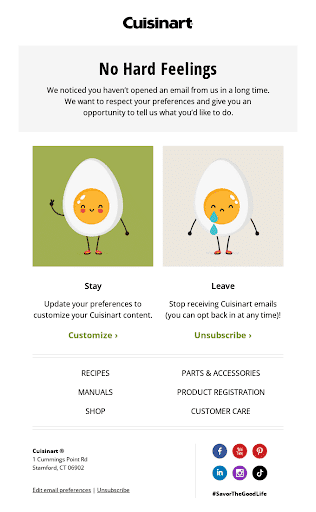
Sending a re-engagement campaign is a last-ditch effort to see if they want to stay on your list. If they don’t engage with that email, either, then it’s time to say buh-bye.
If this all seems daunting, Validity’s end-to-end marketing success solutions have you covered. DemandTools from Validity can help you clean, monitor, and maintain your marketing data. Pair that with BriteVerify from Validity to make sure all new email addresses added to your list are real, working addresses—no typos or spam traps here!
5. Monitor and measure your email sender reputation with Validity
Your sender reputation is a core part of your email marketing strategy. Without inbox placement, all of the work you’re doing crafting, designing, and coding incredible email campaigns evaporates.
The thing is, there’s no magic wand you can wave to fix your deliverability. The best thing you can do is still send great emails, which is what we’ve always been about here at Litmus.
If you’re struggling with your deliverability, go back to your data. With Validity, you can easily see patterns in your email list to determine engagement and inbox placement—and make sure current and new subscribers alike receive targeted, relevant email messages that they can’t help but engage with.
See how Validity can help with your inbox placement and maximize subscriber reach >

Kayla Voigt is a B2B Freelance Writer.
