Key takeaways ✨
|
AI isn’t the new kid on the block or the hypothetical use case anymore. Our 2025 State of Email research found that nearly 70% of email marketers expect up to half of their email operations to be AI-driven by the end of 2026.
But jumping on every new feature or buzzword without thinking through how it supports your goals and workflows just costs you time, budget, and strategic focus. Instead, teams have to start with a clear sense of what they’re trying to do before they throw AI tools into the mix.
This guide helps you gauge where AI can genuinely move the needle in email—and where it’ll just create noise. We’ll cover key use cases, how to evaluate AI tools for email marketing, and how to integrate AI responsibly.
Table of contents
- How email teams are actually using AI now
- What AI actually brings to email
- Why human oversight still matters when using AI
- Where AI helps across the email workflow
- How to pick the best AI tools for email marketing
- Popular AI email tools
- Best practices for implementing AI in email marketing
How email teams are actually using AI now
In 2024, artificial intelligence (AI) mostly showed up on email marketers’ radar as a somewhat helpful sidekick. While nearly half of teams were already experimenting with AI in email, most use cases were low-stakes content creation, like:
- Brainstorming ideas
- Drafting email copy
- Generating subject lines
By the time the State of Email Report 2025 was released, the tone had changed. While the more straightforward use cases are still around, AI is becoming part of how email campaigns are created, from start to finish. Nearly 70% of email marketers now expect up to half of their email operations to be AI-driven by the end of 2026, and 18% predict that 50-75% of their email marketing will be AI-driven.
What’s different now:
- AI is evaluated as part of the core email workflow, not a one-off tool
- Teams are looking for repeatable efficiency gains, not novelty
- The focus has shifted from “Can we use AI?” to “Where does AI actually help?”
AI adoption is moving quickly, but its value still depends on how you use it and where it fits into the workflow.
Beyond basic automation: what AI actually brings to email
AI has earned its place in email marketing not because it’s creative or visionary, but because it’s fast and good at working with large amounts of information. That means there are areas where AI can help and others where it still needs human judgment.
Where AI shines
- Speed: First drafts of email copy, performance summaries to share with the team, and flags on small issues happen faster with AI helping.
- Scale: AI can analyze large datasets, monitor engagement across programs, and support personalization efforts that would be difficult to manage by hand.
- Starting points: AI gets teams past the blank page by suggesting subject lines or making it easy for non-designers to mock up concepts to share.
In these areas, AI doesn’t replace marketers. It helps them spend less time getting started and more time refining what matters.

Where AI struggles
- Original strategy: AI can remix what already exists, but it can’t define goals, positioning, or creative direction.
- Inclusivity and accessibility: AI-generated content can reinforce bias or overlook accessibility best practices.
- Context and nuance: There’s still something special (and necessary) about human help to understand situations and get the brand voice right.
Why human oversight still matters when using AI
AI isn’t built to understand what’s true or appropriate in a specific situation. It’s built to guess what sounds right based on patterns it’s seen before. That’s why AI-generated content can feel awkwardly stitched together or not quite right for the situation. Since the outcomes are only as good as the inputs, you can also run into issues with accessibility or bias.

Generally, a bit of human editing and email testing can clear up issues. When you know how to work with AI in email you can improve performance and easily test new angles.

Where AI helps across the email workflow
AI can’t replace human judgment, but it can reduce friction across the workflow. Below are the areas where AI is having the most practical impact today, along with what to keep an eye on as you adopt it.
| Email function | Why teams use AI here | When it makes sense to implement | What to watch out for |
|---|---|---|---|
| Idea generation | Speeds up brainstorming and helps overcome the blank-page problem | When planning campaigns or filling a busy send calendar | Outputs can feel generic without strong prompts and human refinement |
| Editing and proofreading | Cleans up drafts faster and reduces back-and-forth review cycles | Before QA and stakeholder review | May miss nuance or compliance requirements |
| Visual content creation | Generates concepts or placeholders quickly (even for non-designers) | When design resources are limited or timelines are tight | AI visuals usually aren’t final version ready |
| Hyper-personalization | Makes dynamic content beyond basic merge tags possible at scale | When you have solid first-party data and clear segments | Poor data or over-targeting can feel intrusive |
| Advanced automations | Triggers smarter workflows based on behavior or predictions | When lifecycle journeys get complex | Over-automation without strategy can increase fatigue |
| Data-driven insights and prediction | Spots patterns and ways to optimize campaigns | During performance reviews and planning cycles | Insights need validation; correlation doesn’t mean causation |
AI is great for idea generation
If you’ve ever stared at a blank page willing your brain to come up with something (anything!) then you’ll understand what a boon idea generation is. From subject line ideas to draft outlines, AI tools can quickly create starting points that you can add your magic touch to. Copywriting use cases are among the most common today. In 2025, 49% of marketers use generative AI for static email copy, and 41% use it for dynamic written content, such as real-time personalization.
Editing and proofreading is quicker with AI
AI can be a first-round reviewer of your email content that spots grammar issues or spots that need simplification. Quick checks at this stage can catch small issues before they head to QA or stakeholder review.
AI can assist with visual content creation
While image generation is still finding its footing in email, it’s clearly picking up steam. Litmus data shows a 340% increase in marketers using generative AI for image creation between 2024 and 2025.
We don’t recommend turning your entire design process over to AI, but it can be helpful for tasks like exploring visual directions or themes early in the campaign process or creating rough placeholders to pass along.
Hyper-personalization is faster with AI
You want to create relevant emails, but only so much is possible by hand. The scale of AI makes it easier to dynamically show different products, tweak a headline, or change a call-to-action between customers. For teams with clean data, AI can also help generate small copy variations, so emails feel more relevant without creating everything from scratch.
Use AI to create advanced email automations
AI builds on standard automation by helping teams decide when and how emails are triggered. Instead of relying only on fixed rules, AI can spot patterns in engagement and suggest workflows to try based on what could work next.
In past years, 62% of teams reported spending two weeks or more to produce a single email. In 2025, that number dropped to just 6%, which might reflect time savings from AI and automation tools.
Data-driven insights and predictive analysis
AI is especially good at sifting through large amounts of email data and calling out patterns most teams wouldn’t catch on their own. Today, at least 41% of companies are using AI-driven analytics in some way. Many start with basics like segmentation and targeting, then move into things like send-time optimization (34%), behavioral prediction (32%), and journey mapping (30%).
Instead of guessing or reacting after performance drops, these insights help teams decide where to test, tweak, or step in next.
How to pick the best AI tools for email marketing
There’s no shortage of AI tools promising to “transform” email marketing. The real challenge is figuring out which ones are worth your time, budget, and attention. There are three phases to evaluating AI tools for email marketing:
- Align: Get clear on the problem you’re solving and who owns the decision.
- Assess: Evaluate tools against your actual workflow and preferences.
- Apply: Pilot tools with real campaigns and measure the impact.
1. Align: Start with your real needs (not the tool)
Before you look at demos or pricing pages, take a step back and get specific about what you’re trying to improve. The goal at this stage is to decide which part of your workflow needs help, like content creation, quality control, automation, or insight, so you can evaluate tools with a specific use case in mind.
A few questions to ground the conversation:
- What problem are we actually trying to solve? Is it speed? Scale? Quality? Insight? Consistency?
- Where is our biggest bottleneck today? Idea generation, production time, QA, personalization, or analysis?
- Who owns review and accountability? If an AI-assisted email misses the mark, who’s responsible for catching it?
When you tie AI use cases directly to these pain points, it becomes much easier to get buy-in. “This saves us X hours per campaign” or “This helps us spot trends we’re currently missing” lands better than “We want to try AI.” It also helps to tailor your pitch to your audience or industry.
Different teams tend to value different outcomes:
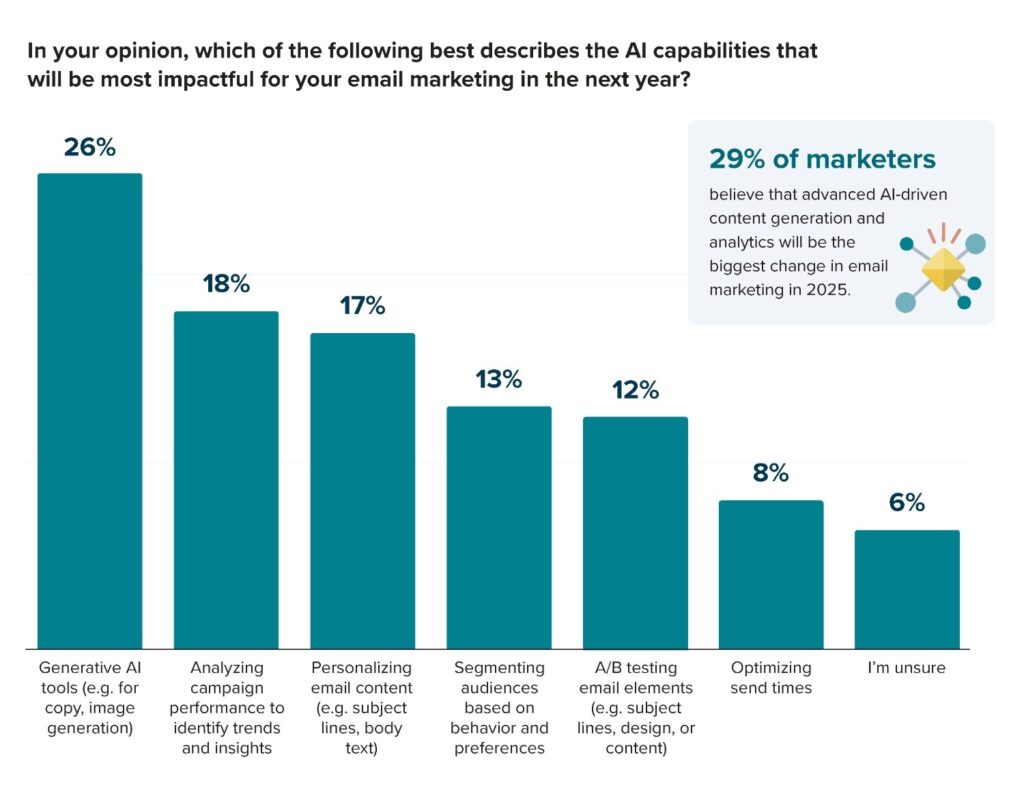
- B2B teams often gravitate toward generative AI tools because headcount is tight, and content demands are high. Faster drafting and iteration can free up limited resources.
- B2C teams are more likely to prioritize AI-driven analytics and insights, especially when proving ROI or identifying performance trends is a constant challenge.
2. Assess: Evaluate tools on how they fit into your workflow
Once you’ve narrowed your focus, look past flashy outputs and evaluate how a tool fits into your existing process.
Key criteria to consider:
- Workflow fit: Does the tool support how your team works today, or does it create a parallel process? Look at integrations and collaboration features.
- Brand control and guardrails: Can you set tone, style, and boundaries, or will everything need heavy rewriting?
- Transparency in data usage: Is it clear what data the tool uses and how inputs are handled?
- Explainability: Can the tool explain why it’s making a recommendation, or is it a black box?
- Accessibility and inclusivity: Does it help support accessible emails, or create more cleanup work?
- Is it AI or automation? Confirm if the tool offers prediction and insight, not just rules-based execution with new branding.
3. Apply: Test tools the way you’d actually use them
Once a tool looks promising, put it to work in real scenarios. This is where you’ll see whether it truly adds value or just looks impressive in a demo. A focused pilot usually runs one to two campaigns, or a single lifecycle flow.
A practical evaluation checklist:
- Test the tool using real or recent campaigns
- Compare AI-assisted output against your current process
- Review results with legal, brand, accessibility, and deliverability stakeholders to flag concerns
- Measure impact in practical terms: time saved, fewer revisions, clearer insights
What you’re looking for here are measurable gains. You want to see shorter production cycles, better quality, or better visibility into performance before you jump all in. Even if the results aren’t what you’re looking for now, you can always keep them as examples to learn from.
Best AI email marketing tools for enterprise businesses
Enterprise teams tend to get the most value by matching tools to specific use cases. However, AI is progressing so quickly that many AI companies are adding more and more offerings every day. Below are four AI tools, each representing a different category where AI is already delivering practical value for email teams.
AI tool for email copywriting and content generation
Tool: Jasper
Category focus: Generating subject lines, email copy, and content variations at scale
Why it wins:
- Purpose-built AI writing workflows for marketing use cases
- Strong controls for tone, brand voice, and content intent
- Makes it easy to generate and compare multiple copy variants
- Often used to ideate messaging angles that inform both copy and creative direction
Use it when your biggest bottleneck is getting content started and you want faster drafts and variants without handing off final decisions to AI.
AI email marketing platform for higher‑performing campaigns
Platform: Validity Engage
Category focus: network‑level intelligence, agents that act as a system, and proactive optimizations
Why it wins:
- Automatically find and fix rendering, code, and compliance risks before emails go out.
- Generate on‑brand copy and variants so more emails meet your standards by default.
- Monitor subscriber experience and deliverability so you can catch issues early and keep critical programs out of trouble.
- See how you stack up against competitors, where you’re losing attention, and what to change next.
Use it when you need more reliable and consistent email sends.
AI tools for email automation and lifecycle marketing
Tool: ActiveCampaign
Category focus: AI-augmented automation, lifecycle journeys, and behavior-driven workflows
Why it wins:
- Combines automation with AI-assisted segmentation and send-time optimization
- Uses behavioral signals to refine when and how emails are triggered
- Supports increasingly complex lifecycle journeys as programs mature
- Helps teams scale without relying solely on static rules
Use it when your lifecycle programs are growing more complex and you need automation that adapts based on behavior.
AI tools for email analytics, personalization, and prediction
Tool: Salesforce Agentforce Marketing
Category focus: AI-driven analytics, predictive insights, and personalization at scale
Why it wins:
- Embedded AI across analytics, segmentation, and personalization workflows
- Surfaces engagement trends and prioritizes optimization opportunities
- Supports predictive send-time optimization and behavioral modeling
- Enables personalization across complex, multi-step customer journeys
Use it when you need help prioritizing what to optimize next, using predictive insights rather than relying only on historical reports.
AI-powered email intelligence
Built on the world’s largest email data network, Validity Engage removes risk and boosts email performance—so you can produce exceptional results in less time.
Best practices for implementing AI tools in email marketing
Layering AI into email marketing takes time, with plenty of testing and refining along the way. Here are a few best practices to keep in mind as you start using (or expanding) AI across your email workflow.
Start small and scale purposefully
AI works best when it’s applied to a clear, well-defined use case. Instead of rolling out a new tool everywhere at once, start with a single part of the workflow—like idea generation, copy refinement, or performance analysis—and build from there.
This approach makes it easier to:
- Evaluate whether the tool is actually saving time or improving quality
- Identify where guardrails or review steps are needed
- Build internal confidence before expanding usage
If you’re looking for a step-by-step walkthrough, we cover this approach in more detail in A Practical Guide to Using AI in Email Marketing.
Maintain human oversight and brand voice
AI can generate options quickly, but it doesn’t understand your brand, audience, or business context the way your team does. As Karen Talavera, Founder & Principal at Synchronicity Marketing, puts it, “We still need human oversight. We are not ready. It’s the wild west. We are not ready to give up human input, but especially human oversight.”
Prioritize data privacy and responsible use
AI tools are only as responsible as the way you use them. Take time to understand how it handles data and whether that aligns with your policies. Clear guidelines and transparency go a long way in building trust.
Measure, learn, and iterate
Treat AI adoption like any other change to your email program: measure the impact, learn from what works (and what doesn’t), and adjust.
Helpful metrics often include:
- Time saved in drafting, editing, or review
- Fewer revisions or less rework during QA and approvals
- Clearer, more consistent messaging across campaigns
- Performance improvements, such as engagement or response rates
Avoiding common AI implementation mistakes
Even well-intentioned teams can run into trouble when AI is introduced too quickly or without guardrails. A few pitfalls to watch out for:
- Publishing without review. AI output should never go straight to send without human oversight.
- Over-personalization without consent or context. Relevance matters, but personalization that feels invasive can erode trust.
- Blind trust in AI insights. AI can surface patterns, but it can’t explain business context. Use the insights as one reference point instead of the end-all-be-all.
- Ignoring accessibility. AI doesn’t automatically account for inclusive language or accessible design. Those checks still matter.
Give your email strategy a boost with AI tools
AI is already changing how email teams work. It helps them move faster, spot patterns sooner, and spend less time stuck on repetitive tasks. But the biggest gains don’t come from handing everything over to AI. They come from using it with intention to support strategy and free up human time for higher-value thinking.
Because at the end of the day, email marketing is all about connection. The tools are meant to support the people who do the work, so they can add the magic touch that makes it all worth opening.
Eric Stelle summed it up nicely, saying,“So long as email remains both an art and a science, we won’t be replaced.”
Billions of email signals. One clear next move.
Validity Engage catches email and data problems, predicts performance, and tells you what to fix—automatically.

Steph Knapp is a Freelance Content Writer for SaaS and B2B companies.
